
Why do UTMs show (not set) in GA4—and when should you fix it?
Understand why GA4 reports (not set) for campaign, source or content even when sessions and engagement look healthy—and how to tell normal gaps from broken tracking.
What does (not set) mean in GA4?
(not set) is the placeholder GA4 shows when it has no value for the dimension you are viewing. It is not an error message, and it does not mean the visit was lost. Sessions, engaged sessions and key events can all be counted while one dimension—such as Session manual ad content—stays empty.
That is why a (not set) row can still carry plenty of sessions and engagement. The metrics describe what visitors did; the dimension simply describes a label GA4 never received.
Why referral and direct traffic show (not set)
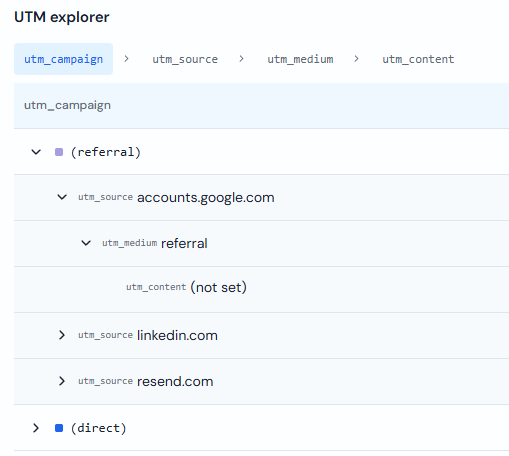
A visitor arriving from a normal link—a Google sign-in page, a LinkedIn post shared without tags, or a link in an email client—brings a referrer, not UTM parameters. GA4 derives source and medium from that referrer, for example linkedin.com / referral, but there is no campaign name or content value to read. Those fields appear as (referral) or (not set).
Direct traffic works the same way: Google’s Direct rule uses source (direct) with medium (none) or (not set). Optional fields you deliberately leave out, such as utm_content or utm_term, will also be (not set) for those links. None of this needs fixing.
Google Analytics: default channel group definitions · Google Analytics: understand (not set) in reports
When (not set) is a real tracking problem
Look closer when a link you tagged yourself—a newsletter, paid placement or partner link—appears with (not set) campaign, or with (not set) source / medium. That suggests the parameters never reached GA4, or the session lost its context.
Common causes: redirects or link shorteners that drop the query string; single-page apps that change the URL before the first page_view; sign-in or payment flows on another domain that start a new session (consider cross-domain measurement or unwanted-referral settings); events sent before the Google tag is configured; and server-side or Measurement Protocol events sent without valid session information.
- Only investigate rows for links you know were tagged.
- Compare the affected dates with recent site, redirect or tag changes.
- Check whether a sign-in, checkout or booking domain appears as a referrer.
- Ask your tracking owner about server-sent events and tag order.
Google Analytics: understand (not set) in reports · Google Analytics: set up cross-domain measurement · Google Analytics: identify unwanted referrals
Check the right scope before you worry
GA4 has user-, session- and event-scoped traffic dimensions. First user campaign, Session campaign and Campaign answer different questions and fill in differently. Mixing them—or pairing a session dimension with an event-only metric—can produce extra (not set) rows that are a reporting artefact, not missing data.
In Reports → Acquisition → Traffic acquisition, keep session dimensions together: Session source / medium plus Session campaign. In an exploration, avoid combining scopes unless you understand how GA4 joins them.
How to fix it for future campaigns
Tag every link you distribute with utm_source, utm_medium and utm_campaign, and add utm_content when you want to compare creatives. Open the final link in a private window, follow every redirect and confirm the parameters are still in the address bar on the landing page.
Then, with analytics consent granted, confirm the visit in GA4 Realtime or DebugView. Fixes apply to new visits only: GA4 never rewrites (not set) rows it already processed, and reports can take 24–48 hours to settle.
Tagged link that survives redirects
https://traceflow.migamo.es/?utm_source=newsletter&utm_medium=email&utm_campaign=202610_leads_demo&utm_content=header_cta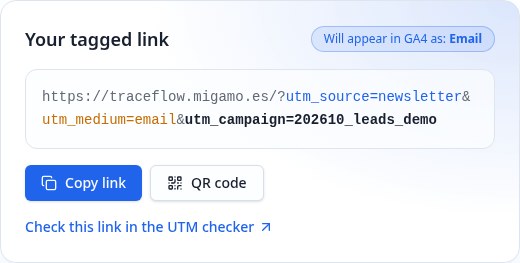
Is (not set) worth your time?
Ask one question: did I tag this traffic? If not, (not set) is simply honest reporting—read the row by its source and medium. If you did, treat it as a collection bug and work through redirects, domains and tag order.
Traceflow keeps (not set) visible in its UTM explorer instead of hiding it, so you can see how much engaged traffic is untagged and decide where better tagging would pay off. It reads your GA4 data; it cannot fill in values GA4 never received.
Free UTM checker
Paste the links you already shared and catch missing source, medium or campaign values before they turn into (not set) rows.
Open the UTM checker →Quick answers
What does (not set) mean in GA4?
It is a placeholder showing that GA4 received no value for that dimension. The visit and its engagement can still be fully recorded.
Why does (not set) have so many sessions and engagement?
Metrics and dimensions are independent. Untagged referral and direct visits are real, engaged visits—they simply have no campaign or content label.
Is (not set) bad for my GA4 data?
Not necessarily. It is expected for referral, direct and partially tagged links. It is only a problem when links you tagged lose their parameters.
How do I fix (not set) campaign in GA4?
Tag every link you distribute, test that redirects keep the parameters, check cross-domain flows and tag order, then verify new visits in Realtime.
Is (not set) the same as Unassigned?
No. (not set) means a dimension has no value; Unassigned means the traffic matched no default channel rule.
Can I fix historical (not set) rows?
No. GA4 does not rewrite processed data. Fixes apply to visits collected afterwards.
Sources
Written from hands-on B2B campaign work and checked against the Google documentation below. General guidance, not audited campaign results.